# What is Bancor?

Bancor is an ecosystem of decentralized protocols that promote onchain trading and liquidity. Bancor has always been at the forefront of DeFi innovation, beginning in 2017 with the invention of bonding curves, pool tokens, and the first fully decentralized exchange powered by AMMs - which still remain extensively used across the industry.

Its flagship protocol, [Carbon](https://www.carbondefi.xyz/)[ DeFi](https://carbondefi.xyz/), is a decentralized trading protocol allowing users to perform automated trading strategies using custom onchain limit orders and range orders, with an innovative offering of recurring orders - a novel trading strategy consisting of two linked orders, one to buy and one to sell. When one order is filled, newly acquired tokens automatically rotate and fund the opposite order, continuously compounding profits with each rotation.&#x20;

By design, Carbon DeFi's novel limit, range, and recurring orders are irreversible on execution and easily adjustable directly onchain. These capabilities give users an unprecedented level of control and automation to perform trading strategies onchain.

The [Arb Fast Lane](https://blog.bancor.network/revolutionizing-arbitrage-in-defi-with-the-arb-fast-lane-protocol-12c9de61c543), a separate open-source arbitrage protocol, allows any user to perform arbitrage between Bancor ecosystem protocols and external onchain exchanges and redirect arbitrage profits back to the Bancor ecosystem.

All Bancor ecosystem protocols are governed by the BancorDAO via staked BNT and vBNT.

&#x20;


# What is the Bancor DAO?

Bancor is operated by its community as a decentralized autonomous organization (DAO). The Bancor Protocol is governed via a democratic and transparent voting system which allows all DAO participants to get involved and shape Bancor’s future.

View proposals in our [governance forum.](https://gov.bancor.network/) Stake BNT or vBNT using the [Bancor app](https://app.bancor.network/vote) and vote [here](https://vote.bancor.network).


# How do I join the Bancor DAO?

To join the DAO:

1. Stake your BNT or vBNT [here](https://app.bancor.network/vote).&#x20;
2. Participate in ongoing discussions on the [governance forum](https://gov.bancor.network/) to help develop BIPs (Bancor Improvement Proposals).
3. Visit [vote.bancor.network](https://vote.bancor.network/) to vote on live proposals.

{% hint style="info" %}
Voting uses a **snapshot block** - government tokens need to be staked prior to the snapshot block in order to vote on an active proposal. If you've staked after the proposal went live, you will only be able to vote on future proposals.
{% endhint %}


# Creating a Bancor Improvement Proposal (BIP)

Below is a simple guide explaining how to create a Bancor Improvement Proposal:

1\. **Publish Proposal**: Anyone can publish a proposal on the Bancor governance forum at gov.bancor.network.

2\. **Discussion Period**: DAO proposal is up for discussion for a minimum of 3 days.

3\. **Voting Period**: After the discussion period has passed, the proposal can be put up on [Snapshot](https://vote.bancor.network) by any DAO member with a minimum of 25k vote power. This generally occurs around Sunday, 5pm GMT with voting period lasting 3 days.

4\. **Voting concludes**: Proposal passes as long as it meets the minimum quorum and FOR votes.

<figure><img src="/files/9GH2TG1Q8fSNmYcKAG2x" alt=""><figcaption><p>Bancor DAO Quorum and Supermajority Requirements </p></figcaption></figure>
5\. **Final steps**: Proposal is moved to the Archive Category on gov.bancor.network. If it passes, the corresponding tasks are added to the Bancor pipeline for implementation.<br>


# Bancor Governance Voting Guide

### Voting Guide

1. Go to: [vote.bancor.network](https://vote.bancor.network/#/)
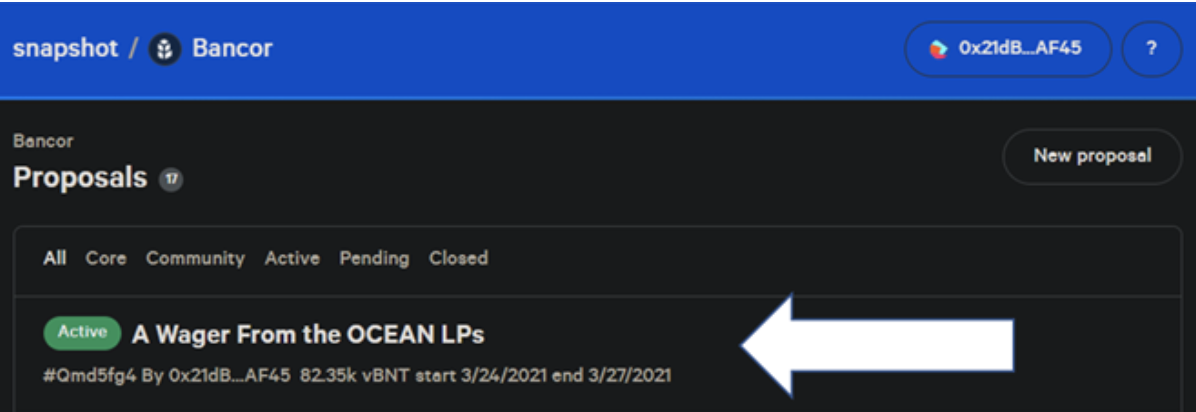
2. Navigate to a specific proposal.

<figure><img src="https://miro.medium.com/max/1400/1*XKLhrAKtvXOMUWLgqadoiw.png" alt="" height="242" width="700"><figcaption></figcaption></figure>

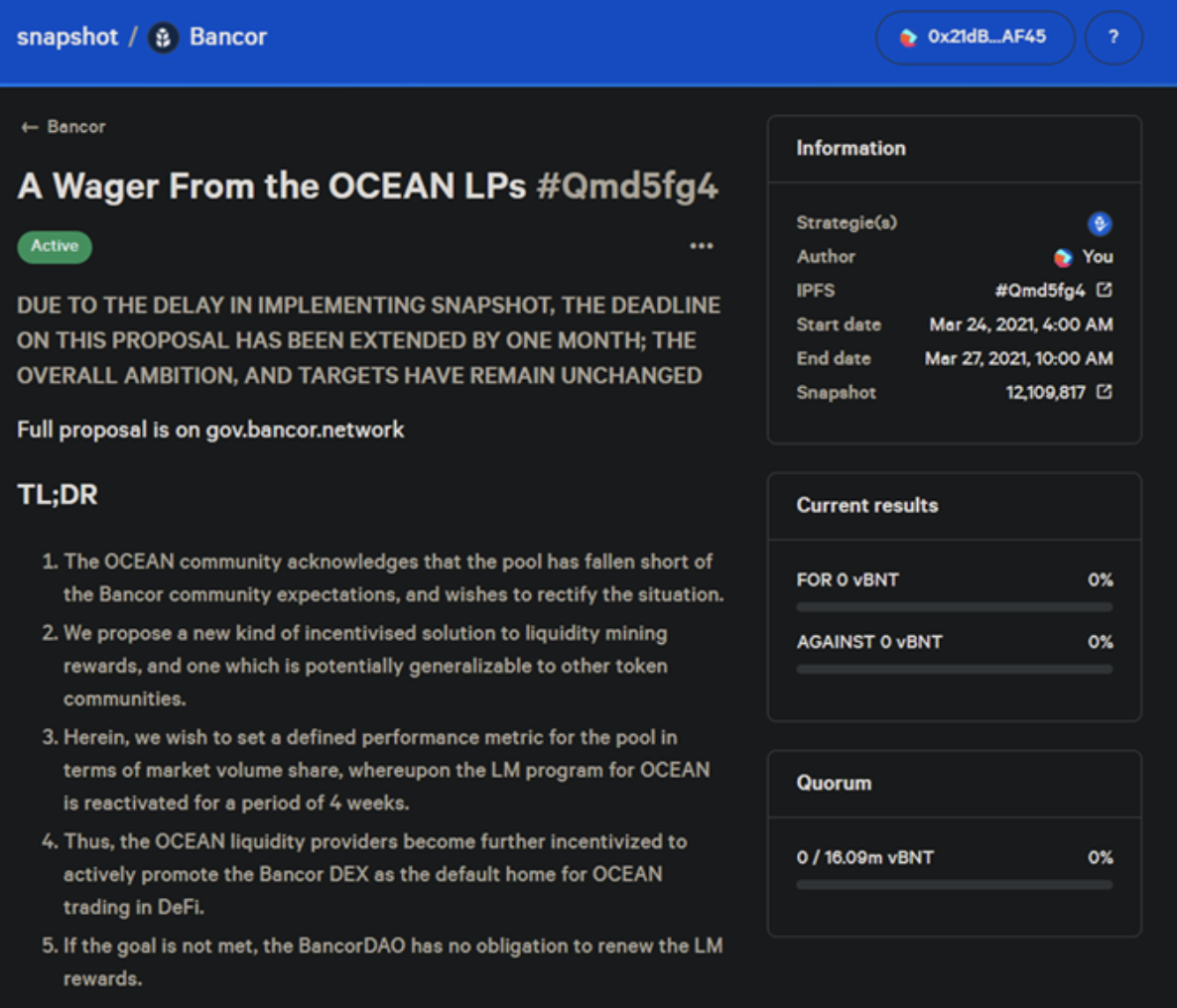
3\. A summary of the proposal will appear on the snapshot page:

<figure><img src="https://miro.medium.com/max/1400/1*G_fEcW_hiXbvPcLvi3Fs9g.png" alt="" height="600" width="700"><figcaption></figcaption></figure>

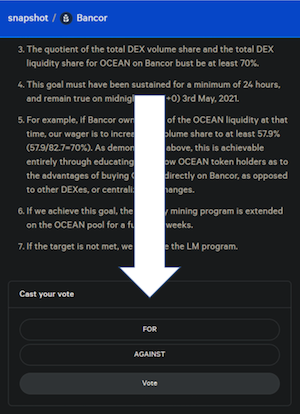
4\. Cast your vote.

At the bottom of the proposal are the familiar FOR and AGAINST buttons:

<figure><img src="https://miro.medium.com/max/600/1*Wt0kcGC0as4mx3bwCzlBtQ.png" alt="" height="414" width="300"><figcaption></figcaption></figure>

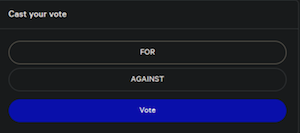
After you have made your selection, the ‘vote’ button will become available:

<figure><img src="https://miro.medium.com/max/600/1*JYsBhHy1fEwWrfIa_32yxA.png" alt="" height="133" width="300"><figcaption></figcaption></figure>

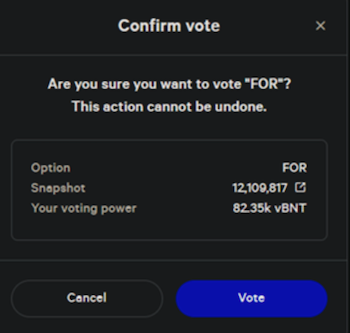
After clicking on the vote button, a confirmation box will appear, summarizing your decision, the snapshot block being used, and the total voting power associated with your address. If you agree with the summary, click ‘Vote’ again.

<figure><img src="https://miro.medium.com/max/700/1*bc6bV86GQhwraT8CwAVqLg.png" alt="" height="333" width="350"><figcaption></figcaption></figure>

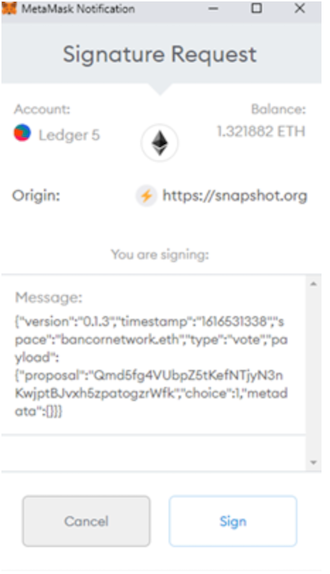
After clicking on the vote button a second time, MetaMask will ask for a signature. This signing process is 100% free — no gas expenses are incurred.

<figure><img src="https://miro.medium.com/max/660/1*TNHgwl1B3Mjfd2aIEy68Gw.png" alt="" height="574" width="330"><figcaption></figcaption></figure>

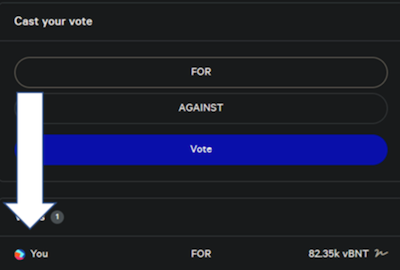
After signing, you should see your vote cast at the bottom of the page:

<figure><img src="https://miro.medium.com/max/800/1*3OlGY-uatwjvXzvapc556w.png" alt="" height="270" width="400"><figcaption></figcaption></figure>

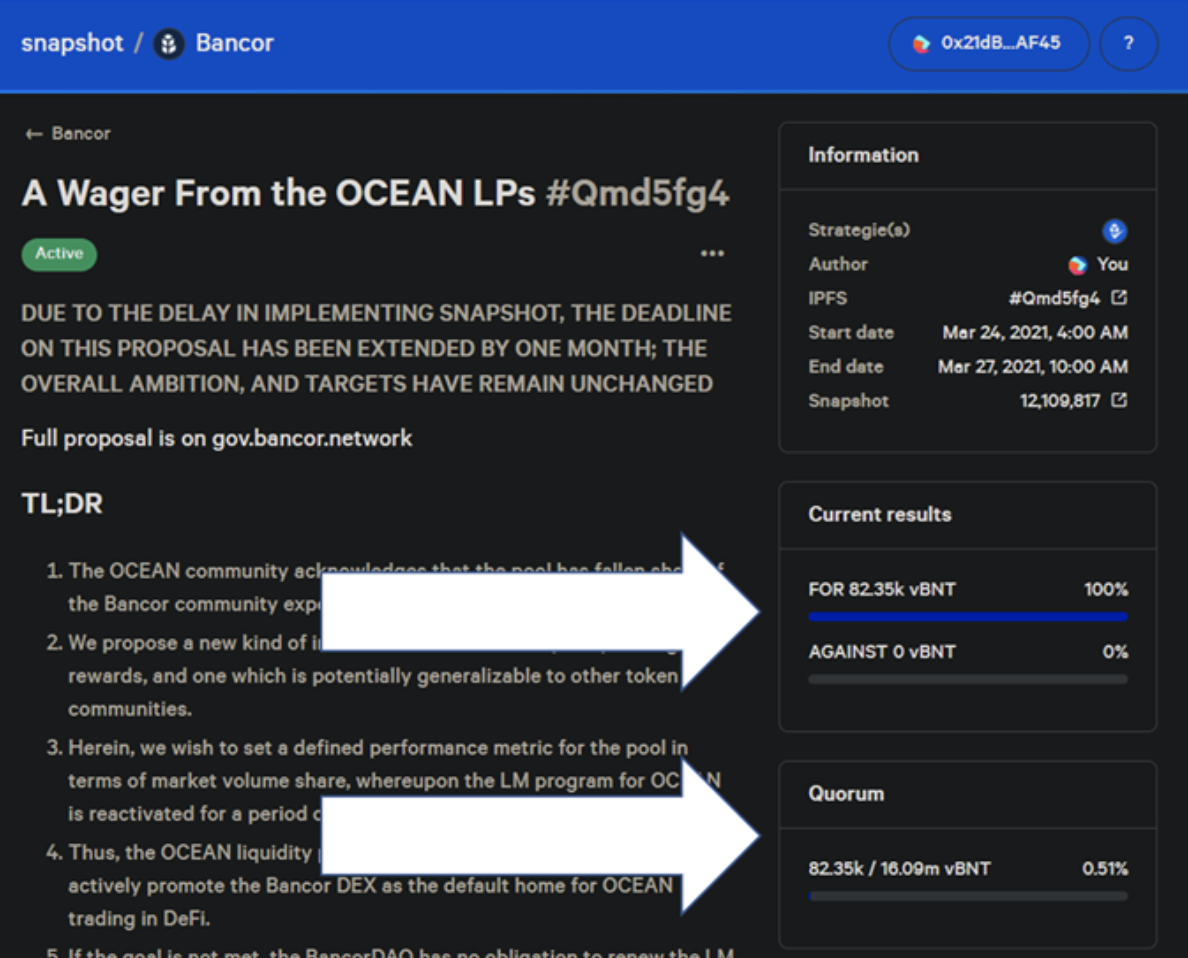
After refreshing the page, the current quorum and majority stats will update.

<figure><img src="https://miro.medium.com/max/1400/1*bd7ihqbR5VmRyd8DyeYTXw.png" alt="" height="370" width="458"><figcaption></figcaption></figure>

Participate in the Bancor [governance forum](https://gov.bancor.network/) and learn more about [Bancor DAO](https://support.bancor.network/hc/en-us/articles/5425550065426)!


# Quorum and supermajority requirements

![Bancor DAO Quorum and Supermajority Requirements ](/files/9GH2TG1Q8fSNmYcKAG2x)
&#x20;


# What is the governance contract address?

Bancor DAO supports two governance tokens:

BNT contract address is 0xebFaFc802533F3D2835Af7464Fcd4492e8F82eB2, which can be viewed [here](https://etherscan.io/address/0xebFaFc802533F3D2835Af7464Fcd4492e8F82eB2).

vBNT Contract address is 0x892f481bd6e9d7d26ae365211d9b45175d5d00e4, which can be viewed [here](https://etherscan.io/address/0x892f481bd6e9d7d26ae365211d9b45175d5d00e4).


# How do I trigger the BNT Vortex?

For the technicals on how to trigger the BNT Vortex, please review our [developer documentation](https://docs.bancor.network/guides/triggering-the-bancor-vortex-burner).


# AMM: Automated Market Maker

Bancor is recognized for its foundational role in the DeFi space, having developed the first fully [decentralized AMM powered exchange](https://blog.bancor.network/rethinking-the-order-book-the-march-towards-automated-markets-150f1325fb8c). Bancor's debut [introduced](https://patents.google.com/patent/US11107049B2/en?q=\(Methods+for+Exchanging+and+Evaluating+Virtual+Currency\)\&oq=Methods+for+Exchanging+and+Evaluating+Virtual+Currency) the equations, mechanisms, and concepts that continue to serve as the bedrock on which decentralized exchange remains founded a decade later.

Bancor introduced a network of onchain liquidity pools to pair pools of tokens with one another. Users can trade against these pooled token pairs, with prices set algorithmically based on both the size of the user’s trade and the depth of the corresponding token pools.

This novel approach to market making proved to be a paradigm shift within the decentralized exchange (DEX) space. Traders now have guaranteed access to onchain liquidity with transparent, upfront pricing, doing away with the need for a counterparty. Token owners can also turn existing holdings into productive assets through liquidity provision to these DEX pools, earning returns from protocol swap fees imposed on trades that get routed through the platform.

This has turned pooled market-maker liquidity into a new asset class (“liquidity positions”), allowing for broader, more competitive involvement in market making.

Bancor's foundational [whitepaper](https://bancor.network/whitepaper), penned in 2017, lists Eyal Hertzog, Galia Benartzi, and Guy Benartzi as its architects. The name Bancor pays homage to John Maynard Keynes, who, in 1940, introduced the term to conceptualize a supranational currency.


# Trade


# What fees do I have to pay when I trade?

There are two different fees associated with trading:&#x20;

1. Gas/Transaction fees (network fees)
2. Trading fees

As the Bancor network operates on blockchains, all transactions will incur gas costs, which are unrelated to Bancor, but rather the network itself. Different wallets such as MetaMask will show you gas estimates.&#x20;

Besides the network gas fees, each pool is set with a percentage fee on each trade.&#x20;


# Price Impact

Price impact is the difference between market price and estimated price due to trade size - how much the size of your trade will impact the liquidity pool. If the pools total worth is $100 and you are trading $10, that will "impact" the pool by 10%.

The greater the liquidity available in a pool, the lower the price impact for a given trade size and the cheaper the trade.

![Ipmact.PNG](https://support.bancor.network/hc/article_attachments/5385026415378/Ipmact.PNG)


# Do I need to own BNT tokens in order to make a trade?

No, you do not need to have BNT in your wallet in order to trade between different tokens. If you want to trade USDC to ETH, you simply need USDC and to pay for the associated network gas fees in ETH.


# Price slippage

Price slippage refers to the difference between the expected price before a transaction is executed and the actual price at which it is executed.

Slippage happens due to the dynamic variables of the Bancor AMM formula. Every transaction changes the price slightly. The larger the transaction size of a token relative to its liquidity depth, the higher the price slippage. When you see the "price slippage" message, you are still able to proceed with your transaction. This is not an indication that may cause the transaction to fail in any way. If you wish to convert tokens, you may proceed.

You may also set a custom slippage percentage ("Slippage Tolerance") to make sure that any transaction with higher slippage will revert. This is available by clicking at the top right menu next to your wallet.

<img src="https://support.bancor.network/hc/article_attachments/5464691637138/Screen_Shot_2022-05-08_at_16.19.29.png" alt="Screen_Shot_2022-05-08_at_16.19.29.png" height="643" width="502">

&#x20;


# Token approval: Approve vs Approve Limited Permission

Like any protocol using smart contracts, you need to provide permissions from the wallet you are using, which requires a transaction to occur with minor gas fees.

Choosing **Approve** means you do not want to approve each time you interact with these tokens in Bancor. Choosing "Approve limited permission" means you do not want the contracts to maintain rights to move previously approved tokens on your behalf, and allows you to specify the number of tokens it can interact with.

![\_\_\_\_\_\_\_.jpg](https://support.bancor.network/hc/article_attachments/5385880674578/_______.jpg)


# Transactions & Metamask


# Connect your Web3 Wallet to Bancor

After you've set up your wallet, you need to make sure you are connected to the right network.

Currently, Bancor is available on the Ethereum Mainnet. You can make sure you are connected to the correct network by clicking on the MetaMask extension in your browser and checking the top box for the information. The network can be changed both when you input your MetaMask password (not private key) or after you've logged in.

<img src="https://support.bancor.network/hc/article_attachments/6777858282258/Ether.PNG" alt="Ether.PNG" height="508" width="300">

This applies to all Web3 wallets - if you connect with an unsupported network, you will see an error message and the Bancor web app will prompt you to change it.

<img src="https://support.bancor.network/hc/article_attachments/6779910608786/NETWORK.jpg" alt="NETWORK.jpg" height="543" width="251">

If you are still facing issues with connecting your wallet, please reach out via email - <support@bancor.network>

<br>


# MetaMask Setup Guide

MetaMask is one among many [Web3](https://en.wikipedia.org/wiki/Web3) wallets that serve as an Ethereum supported crypto wallet and a way to interact with protocols using smart contracts.

Step 1:

Go to [MetaMask.io](https://support.bancor.network/hc/en-us/articles/metamask.io)

We advise bookmarking any link that might be used in order to avoid phishing sites.

Step 2:

Click on "Download" at the top right.

MetaMask is available for computers (as a browser extension) or on iOS/Android. After installing it as a browser extension, you will be prompted to create a new wallet.

Step 3:

Click on "Get Started" and choose "import existing wallet" or, in the case that you do not have a Web3 wallet, choose to create a new wallet.

<img src="https://support.bancor.network/hc/article_attachments/5463785136914/Screen_Shot_2022-05-08_at_14.33.55.png" alt="" height="267" width="469">

Step 4:

Click on "Create a Wallet". A 12-word Secret Recovery Phrase will generate automatically. This phrase will serve as the unique key to the created wallet and cannot be recovered if lost. Be sure to save your 12-word secret recovery phrase somewhere safe and secure.

If you choose to import a wallet by entering your seed phrase, please make sure it's being done in a safe way. No one will ever ask for your private keys in any format unless you recover it from one wallet interface to another.

<img src="https://support.bancor.network/hc/article_attachments/5463816619794/Screen_Shot_2022-05-08_at_14.36.50.png" alt="" height="238" width="502">

Step 5:&#x20;

Create password. Password is required for your future login on the same device.

<img src="https://support.bancor.network/hc/article_attachments/5463833144082/Screen_Shot_2022-05-08_at_14.40.05.png" alt="" height="407" width="378">

Step 6:

You are all set! Now you can either fund your wallet or connect your wallet directly on [Bancor](https://app.bancor.network/pools).

If you have have a hardware wallet, you can connect to it as well. This is done by right clicking on the MetaMask extension followed by the top right circle, which will then open a new tab to choose from.

<img src="https://support.bancor.network/hc/article_attachments/5463887882514/Screen_Shot_2022-05-08_at_14.44.35.png" alt="Screen_Shot_2022-05-08_at_14.44.35.png" height="463" width="331">

**IMPORTANT: No one from Bancor or AmaZix will ever send you a DM** requesting funds or private information regarding your identity or information about your seed phrase and/or private key. Any claim to assist with "smart wallet" or "integrations" is most likely an attempt to steal your tokens. **There is NO Telegram support for Bancor**. Bancor support is via our [knowledge base](https://support.bancor.network/) **ONLY.**

If you still experience issues with MetaMask, you can check their [FAQ here](https://metamask.io/faqs/).
<br>


# Where can I view my transaction history for tax purposes?

You can download a CSV export using [etherscan.io](https://support.bancor.network/hc/en-us/articles/etherscan.io). When you are on etherscan, input your ETH address in the search bar (you can view your ETH address by checking your web3 wallet). Scroll down to see the **\[Download CSV Export]** option.&#x20;

We advise you to consult a local expert in regards to taxes.


# Interacting with Bancor: associated gas fees breakdown

With Bancor, users perform token conversions against smart contracts directly on the Ethereum blockchain. This requires computing transactions on the blockchain and registering the result in the public ledger, which incurs gas fees.

The gas price set by Bancor is the optimal price for a transaction to successfully execute on the Ethereum blockchain within seconds to minutes. The calculated gas price is part of the transactions hard coded values and changing the gas price might cause the transaction to fail.

Possible fees users might pay can be broken down into three different aspects:

**Ethereum network gas fees**

Gas costs that are related to any user interaction with smart contracts on the Ethereum main network, which Bancor is built on.&#x20;

This applies to deposits, withdrawals, or any other action such as staking in a rewards contract or migrating, and varies based on ETH's network congestion or lack of.

The fees associated with depositing and withdrawing depend on the blockchain network activity. A congested network means that gas costs will be higher. We suggest keeping an eye on [Etherscan's tracker](https://etherscan.io/gastracker) for periods of low gas costs. A congested network means that gas costs will be higher.\
\
**Trading fees**

Each token pool has its own fee, determined by the Bancor DAO, that traders pay when they are executing a swap.


# I'm getting a MetaMask "ALERT" error. Should I proceed?

If you get any error with MetaMask when you attempt to perform any action, we advise not to proceed as it is likely to fail. Please reach out to us via email - <support@bancor.network>, so we can troubleshoot and understand why it happened.

![Screen\_Shot\_2022-01-23\_at\_10.39.07.png](https://support.bancor.network/hc/article_attachments/4416075382418/Screen_Shot_2022-01-23_at_10.39.07.png)


# My transaction is pending/ stuck for a long time. Is there anything I can do?

Transactions might be pending if there are previous transactions that were sent from that wallet and aren't completed yet, or if the fee paid to process the transaction is too low, as the network prioritizes transactions with higher transaction fees. You can:

1\. Wait until previous transactions are completed

2\. Cancel

3\. Speed up

You can check these MetaMask guides for more information - [Speeding up & Cancelling](https://metamask.zendesk.com/hc/en-us/articles/360015489251-How-to-Speed-Up-or-Cancel-a-Pending-Transaction)


# Why did my transaction complete but the trade or deposit did not finalize?

Interactions with the application will require you to first grant permission on your behalf. After you've granted permission ([which is done by approving a transaction](/bancor-amm/trade/token-approval-approve-vs-approve-limited-permission)), you will be prompted for another transaction, which will be the actual interaction.

It is also possible that you did approve permissions and the interaction itself, but the second transaction failed. You can check the Notifications bell (top right side) to look at your interaction history. If you are not sure, you can view the status on [etherscan.io](https://support.bancor.network/hc/en-us/articles/etherscan.io) by inputting your wallet address.


# How do I import my existing wallet to MetaMask using my private key/JSON file?

{% hint style="danger" %}
**Never share your private key or JSON file with ANYONE.**

No one from Bancor will ever reach out to you first
{% endhint %}

If you already have a wallet and you would like to use MetaMask to interact with our application to trade or deposit tokens, you can import your secret recovery phrase or JSON file by clicking on "Import account" which is viewable after you click on the top right colored circle in your MetaMask web app. For more information, please check [MetaMask's FAQ](https://metamask.io/faqs/).

![Import Account on MetaMask](https://support.bancor.network/hc/article_attachments/4474313505682/Import_Button.PNG)


# Bancor 3 Mechanics


# Bancor 3 Mechanics - #1 Swap

What happens during “Swap”? - an overview of the protocol and a comparison with the traditional AMM model.

## Swap <a href="#id-3901" id="id-3901"></a>

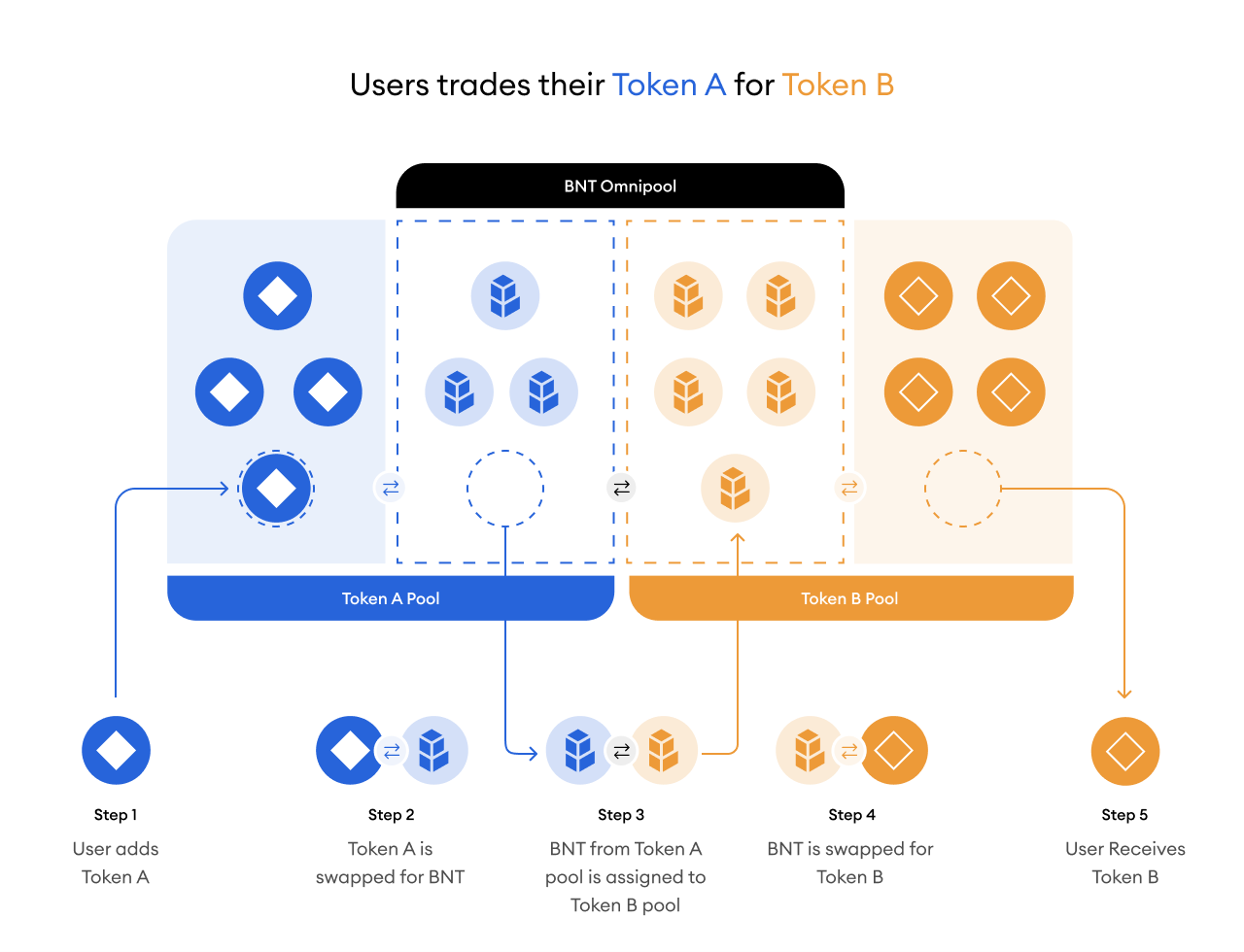
Let’s start with an example of a swap and measure its impact on withdrawals from the system. In Bancor 3, all tokens are paired with the BNT Omnipool. If you are swapping TKN A to TKN B, the following set of swaps will occur:

1. TKN A → BNT
2. BNT → TKN B

Take the diagram below which shows a BNT to TKN swap

<figure><img src="https://miro.medium.com/max/1400/0*u4s9aSXX5GIBU0Lh" alt="" height="512" width="700"><figcaption></figcaption></figure>

Here, we have a pool that consists of Token A and BNT, with each Token A having value of $1.33 and each BNT having a value of $1. in Bancor 3 all pools are weighted 50–50, meaning the total liquidity in the pool is therefore $8, with each side contributing $4.

An outside trader performs a swap on this liquidity pool by swapping 2 BNT for 1 Token A. The final state of the pool after the swap is 2 Token A and 6 BNT. On the Token A side, there is a deficit of 33% (1 out of the original 3 tokens was removed) and on the BNT side there is now a surplus of 50% (relative to the initial quantity 4 vs 6). When looking at the picture as a whole, the liquidity in the pool is now $12 with the cumulative value of each respective token in the pool being $6 (i.e. each side has an even dollar value).

In Bancor 3, all deposits are single sided, meaning users only have to contribute one side of a pool. In our example above, assume that the entirety of the Token A pool was contributed by a single liquidity provider and the Bancor Protocol matched his Token A side deposit with BNT (it contributed the BNT side of the pool). The LP in the Token A pool is currently in a state of deficit, while the BNT pool is currently in a state of surplus. What happens if the Token A LP decides to withdraw?

Read the [Withdrawal article here](/bancor-amm/bancor-3-mechanics/bancor-3-mechanics-2-withdrawal).<br>


# Bancor 3 Mechanics - #2 Withdrawal

What happens during “Withdrawal”? - an overview of how “Surplus” and “Deficits” work within the protocol and a comparison with the traditional AMM model.

Continuing from the previous example, after the swap has occurred there is a deficit that has occurred in the Token A side.

<figure><img src="https://miro.medium.com/max/1400/0*UUJJdPM8_mS3undM" alt="" height="601" width="700"><figcaption></figcaption></figure>

If the LP were to remove his liquidity in the current state then the following series of steps would occur:

1. LP provides his bnTokenA token to the protocol (e.g. 2 bnTokenA which has an underlying value of 2 Token A)
2. The protocol withdraws 2 Token A tokens from the pool and burns the associated 6 BNT tokens that were paired.
3. The LP receives 2 Token A tokens and the protocol mints the equivalent of 1 Token A token in BNT (three in our example) to cover the difference.

Note: A keen observer will realize that there is a key difference in that all BNT that is owned by the protocol is burned at withdrawal. The LP on the other hand, is receiving newly minted BNT that just came into existence.

Previously, the process by which BNT is distributed to cover deficits has been referred to as Bancor’s “Impermanent Loss Protection mechanism”. In reality, IL is a bit of a misnomer and IL may not be the best term for it due to the fact that the BNT distribution mechanism covered more than that.

### Implication of withdrawal during the pause <a href="#f5ea" id="f5ea"></a>

On June 19th, emergency actions were taken to intervene in what would have resulted in an irresponsible mass distribution of BNT tokens during a market panic. As discussed in the[ ratification proposal](https://gov.bancor.network/t/ratification-of-emergency-actions-taken-on-sunday-19th-june-utc/3714?u=mbr), the reason being, pending withdrawals in combination with the BNT distribution mechanism could have crashed the BNT price to essentially zero, leading to a situation in which the recovery of funds for all liquidity providers would have been in peril.

Liquidity providers in Bancor 3 who withdraw from a pool that is in deficit (see example above) will not receive BNT as part of their withdrawal to compensate for pool deficit.&#x20;


# Bancor 3 Mechanics - #3 Overview of Deficit and Surplus on Bancor 3

**Overview of Deficit and Surplus on Bancor 3**

So far, our example has focused on [a swap between Token A and BNT](/bancor-amm/bancor-3-mechanics/bancor-3-mechanics-1-swap). In Bancor 3, all TKN pools are paired with the BNT Omnipool, meaning BNT is the bridged asset between any TKN to TKN swaps (e.g. ETH to wBTC). Consider the initial example:

1. TKN A → BNT
2. BNT → TKN B

This is probably one of the most common (if not the most common) swaps that happen in Bancor 3 and it affects deficits and surpluses across the entire protocol. Let’s walk through an example of a TKN to TKN swap between two pools that use BNT as the intermediary asset.

<figure><img src="https://cdn-images-1.medium.com/max/1600/0*XoQ_A97OGnureiIE" alt=""><figcaption></figcaption></figure>

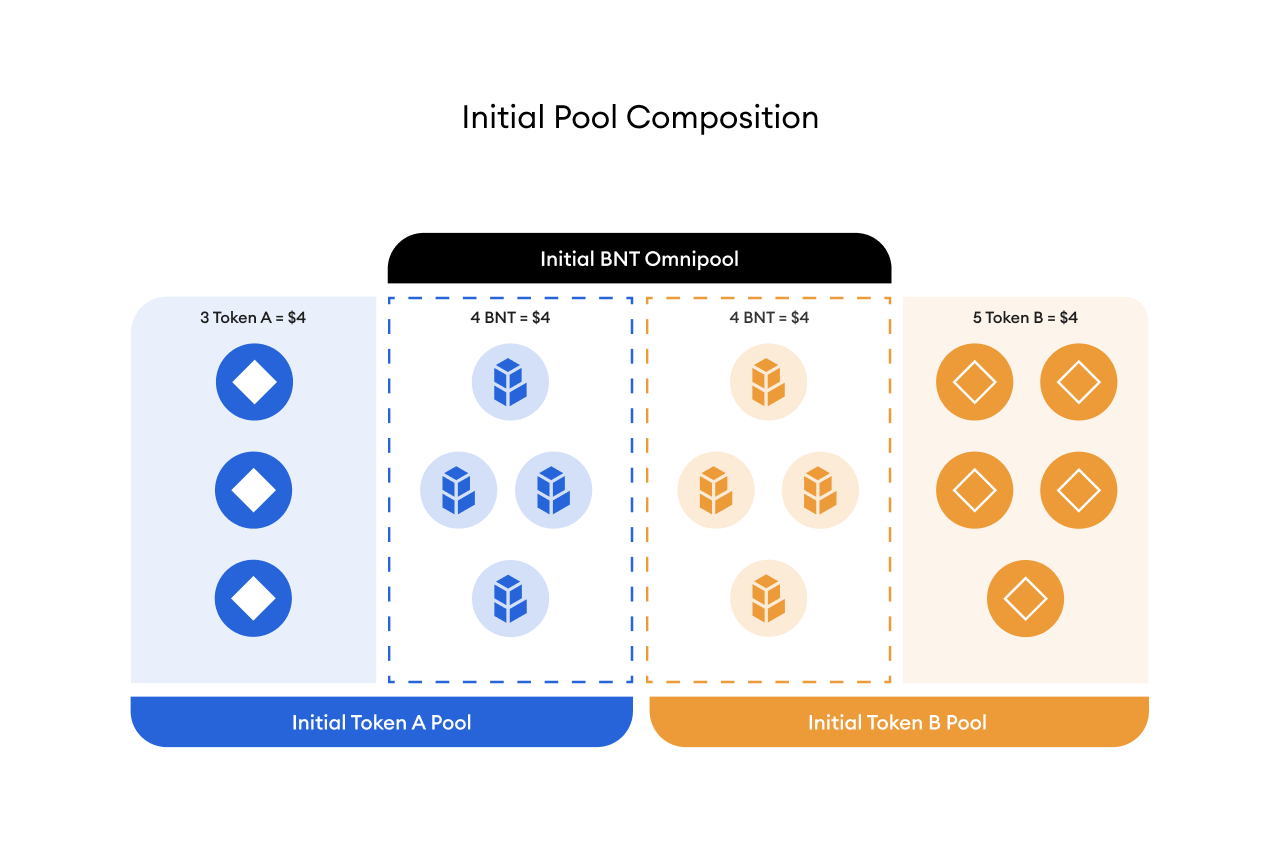
On the left hand side, we have a pool that is composed of 3 Token A and 4 BNT. On the right hand side we have a pool that is composed of 5 Token B and 4 BNT. A total of 8 BNT exist in the Omnipool. An outside trader is looking to swap 1 Token A for 1 Token B.

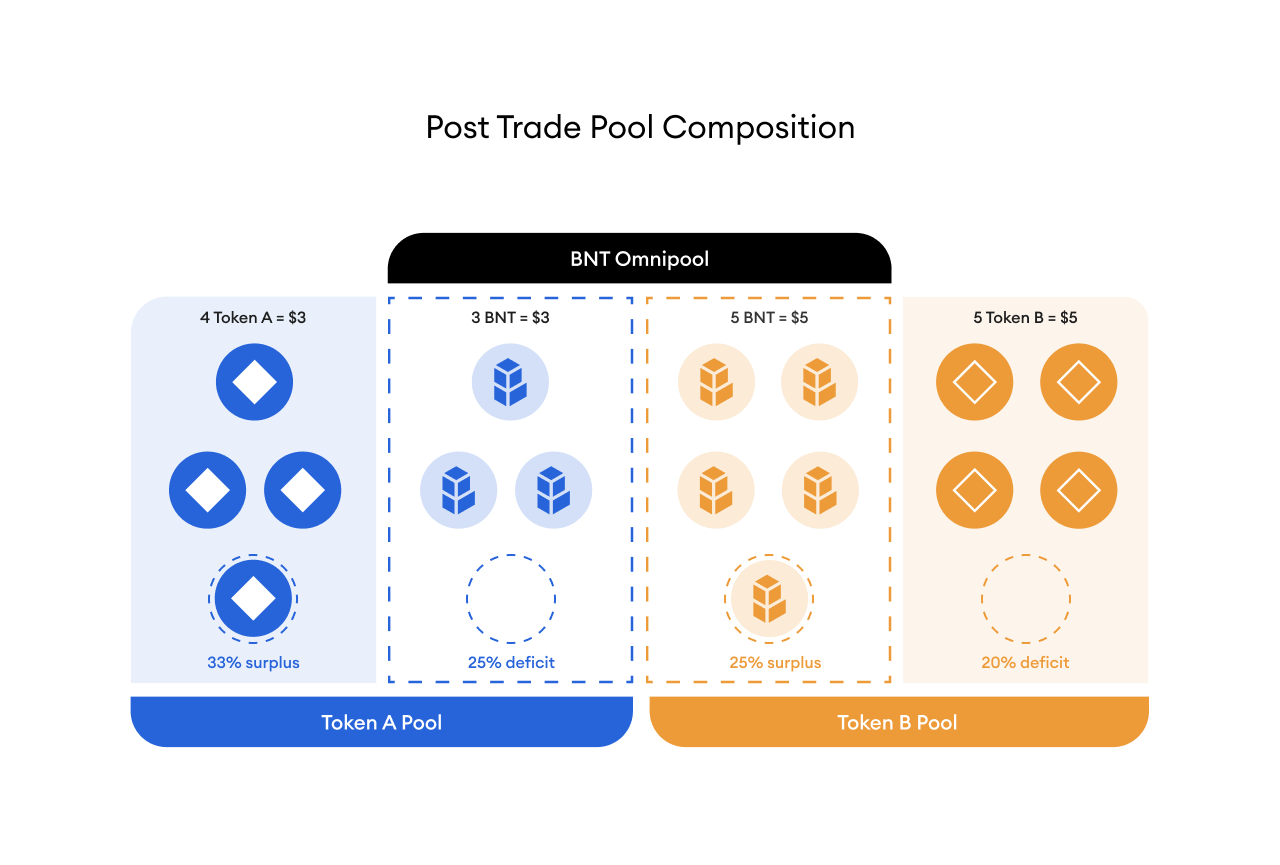
The first swap that occurs is in the Token A pool and 1 Token A is added into the pool while 1 BNT is removed. The state of the Token A pool after the swap is 4 Token A and 3 BNT. This translated to a surplus of 33% on Token A and a deficit of 25% on the BNT side in the Token A pool. Note that internally, the BNT hasn’t left the system and it resides in the omnipool for the next hop of the trade.

<figure><img src="https://cdn-images-1.medium.com/max/1600/0*aq1ImYX0YSM-DbQC" alt=""><figcaption></figcaption></figure>

The next trade that needs to happen is swapping BNT to Token B. The available BNT is added to the BNT side of the Token B pool and 1 Token B is removed from the Token B pool. This Token B has now left the system and belongs to the trader who initially added 1 Token A to receive 1 Token B token in return.

<figure><img src="https://cdn-images-1.medium.com/max/1600/0*slJTQtBx8QKvat-D" alt=""><figcaption></figcaption></figure>

We now have a deficit of 20% on Token B and a surplus of 25% on the BNT side in the Token B pool.

The overall deficit and surplus of the system is the following:

1. 33% surplus on Token A in the Token A pool
2. 25% deficit on the BNT side in the Token A pool
3. 20% deficit on Token B in the Token B pool
4. 25% surplus on the BNT side in the Token B pool

Looking at the system as a whole, the BNT Omnipool does not have a surplus or deficit as BNT tokens have just been shuffled around internally. On the TKN side, Token A has ended with a surplus while Token B is in deficit. This example is used to illustrate that deficits and surpluses in Bancor 3 are a result of trades occurring in the network and fluctuate depending on the trades. In a sense, surpluses and deficits are inherent to Bancor 3 and the relative deficit or surplus of Tokens is a direct result of trading activity.


# Pause of BNT Distribution

On June 19th, BNT distribution was paused per the Bancor DAO’s intervention policy. Information regarding the BNT minting pause is available in two blogposts ([1](https://blog.bancor.network/market-conditions-update-june-19-2022-e5b857b39336),[2](https://blog.bancor.network/bancor-update-june-29-2022-322fbbd993ad))

For the most recent update, please refer to the Bancor v3 Progress Update blog post [HERE](https://medium.com/bancor/bancor-v3-progress-update-e5e63c5e3542).

**Q: Why was the BNT distribution mechanism disabled?**

A: Extreme market conditions on June 2022 exposed an economic vulnerability in the Bancor protocol under specific unforeseen circumstances.

Due to heavy selling pressure on the BNT token at the time, the BNT price rapidly diverged from the prices of tokens listed on the protocol (TKNs) in tandem with large TKN withdrawals from the protocol.

The automated rebalancing of Bancor AMMs resulted in arbitrageurs selling BNT to the protocol in exchange for TKNs, creating deficits in the TKN vault balances.

The amount of BNT distribution needed to cover the pending withdrawals created a runaway effect in the BNT price that may have resulted in only the fastest LPs being able to withdraw from the protocol and the rest of LPs being unable to withdraw at all.

Per the Bancor DAO’s emergency intervention policy, the DAO took emergency action to pause all BNT distribution.

**Q: How does disabling the BNT distribution affect users?**

**A:** BNT distribution is the mechanism that reimburses LPs for deficits from rebalancing and impermanent loss. As a direct result of the BNT distribution being disabled, users who choose to withdraw from the protocol are choosing to do so knowing they are not eligible to receive BNT in the event of vault deficits. Keeping BNT distribution live to cover the deficit would have resulted in that BNT immediately being traded for a user’s originally deposited token, resulting in zero chance the slower moving users would retrieve any of their funds at all.

**Q: What options do I have?**

**A:** v3 BNT liquidity positions remain unaffected by the emergency action. LPs may withdraw the full amount of BNT deposited in addition to any rewards received and/or fees earned.&#x20;

v3 TKN LPs may continue providing liquidity or withdraw without BNT compensation for any deficit.

v2.1 BNT LPs may continue providing liquidity or withdraw the full amount of BNT deposited in addition to any rewards received and/or fees earned.&#x20;

v2.1 TKN LPs may remain on v2.1 or withdraw without BNT compensation for any deficit. &#x20;

**Q: What is the origin of the deficit and what does it mean when a pool has a vault balance in deficit or surplus?**

**A:** Anytime a trade occurs, a deficit and surplus appear. The vault balance represents how many of a specific token are currently in the protocol. The vault is in surplus when it contains more tokens than was directly supplied by liquidity providers. The vault is in deficit when it contains fewer tokens than liquidity providers deposited.

Please refer to this explainer on Bancor v3 mechanics to understand how deficits and surpluses are calculated in v3.  &#x20;

<https://blog.bancor.network/bancor-3-the-mechanics-fb69600ef10b&#x20>;

**Q: How can I calculate my deficit & surplus on v3?**   &#x20;

**A:** On the portfolio page, under holdings, for each token that is in deficit there is a red triangle next to it. Hover over this red triangle to get an approximation of your withdrawal amount.

Alternatively, for v3 a close approximation is to input the ERC20 token contract address in the "stakedbalance" function and compare that to the token quantity in the MasterVault contract.The "stakedbalance" entry represents the initial principal and accrued fees for all users who deposited that specific token.

Master Vault Contract: <https://etherscan.io/address/0x649765821D9f64198c905eC0B2B037a4a52Bc373>

Stakedbalance Function: <https://etherscan.io/address/0x8E303D296851B320e6a697bAcB979d13c9D6E760#readProxyContract#F22>

**Q: I’m trying to make a withdrawal, but it’s telling me "withdrawal is temporarily paused!". Why can’t I make a withdrawal?**

**A:** The price in the pool is too volatile. This is a vital security feature to avoid manipulation of the pools. Please try again in a few minutes.

**Q: If I keep my liquidity in Bancor, will I ever be able to withdraw it all?**

**A:** All users have the ability to withdraw their liquidity from the Bancor protocol. TKN liquidity providers in Bancor v3 who withdraw from a pool that is in deficit will not receive BNT as part of their withdrawal to make up for the pool deficit. In other words, you can decide to hold off on withdrawing until the issues are resolved, or withdraw now with TKN only and zero BNT.

**Q: If I withdrew from Bancor at a loss while BNT distribution is disabled, will I be able to get back my initial amount in the future?**

**A:** Currently, any losses incurred due to deficits by users who withdrew from the protocol are final. The Bancor DAO controls the protocol and has the ability to revisit this in the future.&#x20;

**Q: Will I get more of my TKN if I withdraw before others?**

**A:** The relative deficit or surplus of the system in TKN should remain constant so long as the market does not cause a change in the deficit or surplus. Regardless of the amount of TKN being withdrawn, or depth of the pool, the amount users are able to withdraw is proportional to the deficit of the pool. Example: If a pool has a deficit of 25% and everyone were to leave while the market does not cause a change in the deficit, then everyone will have a 25% deficit in their withdrawal.

**Q: Who made this decision?** &#x20;

**A:** The Bancor DAO passed “BIP21: DAO Multisig Intervention Policy“ that gave the multisig signers emergency powers to take protective actions if an emergency presented itself. Such an emergency presented itself on 6/19/2022 which required special intervention to protect users of the Bancor protocol. All emergency actions taken are subject to a subsequent ratification vote, which the Bancor DAO approved.

Please refer to BIP21 from the Bancor Governance for more information: <https://gov.bancor.network/t/bip21-dao-multisig-intervention-policy/3504&#x20>;

Please refer to the ratification of emergency actions take on Sunday June 19th 2022 for more information: <https://gov.bancor.network/t/ratification-of-emergency-actions-taken-on-sunday-19th-june-utc/3714&#x20>;

**Q: Why is trading still enabled?**

**A:** Trades are good for the Bancor ecosystem and help restore health to the protocol. However, it can lead to fluctuations in pools that are in deficit. If trading is disabled then the DAO needs to make sure that the pools between v2.1 and v3 are well equilibrated (a large effort to undertake). If the pools are frozen then the Bancor AMM will not be in sync with the rest of the markets, and there will be additional complexities with having to rebalance the pools in the future.

**Q: Are there historical analytics to view the deficits/surplus for a token overtime?**

**A:** You can visit our analytics site to get historical information around surplus/deficits for a specific token over time and other Bancor network stats.

Please refer to the analytics site for more information: <https://analytics.bancor.network/>


# Portfolio


# Withdrawal Guide

**1. Connect Wallet**

Make sure you are connected to the correct Web3 wallet that holds the deposited funds on Bancor 3.&#x20;

**2. Go to Portfolio page**

On your [portfolio page,](https://app.bancor.network/portfolio) you can see all of your deposits. Choose the token you wish to withdraw and click on the menu.

![Screen\_Shot\_2022-05-08\_at\_15.21.51.png](https://support.bancor.network/hc/article_attachments/5464178352530/Screen_Shot_2022-05-08_at_15.21.51.png)

&#x20;**Holdings section under the Portfolio tab**

&#x20;

**3. Click "Withdraw"**

In the newly withdrawal window opened, click "Withdraw".

![Screen\_Shot\_2022-05-08\_at\_15.26.43.png](https://support.bancor.network/hc/article_attachments/5464211415570/Screen_Shot_2022-05-08_at_15.26.43.png)

&#x20; **Deposit/Withdraw window**

&#x20;

**4. Start Cooldown**

Now specify how many tokens you would like to withdraw, and initiate the 0-day cooldown period by clicking on "Start Cooldown"

![Screen\_Shot\_2022-05-08\_at\_15.30.38.png](https://support.bancor.network/hc/article_attachments/5464252277650/Screen_Shot_2022-05-08_at_15.30.38.png)

&#x20;

**5. Approval**

After approving the wallet to interact with the tokens / pool tokens, you may withdraw them immediately. You can see how much time is remaining at your Portfolio page, at the top right side under "Pending withdrawals".

&#x20;


# Can I sell my vBNT or transfer it to a different wallet?

If you deposited BNT into v3, you received vBNT. This vBNT can be transferred and/or sold, but you must have the same number of vBNT in your wallet as BNT that you would like to withdraw.


# DeFi 101


# Ethereum/ Web3 wallets

Interacting with the Bancor network requires you to use an Ethereum wallet. You can use various wallets such as [MetaMask](https://support.bancor.network/hc/en-us/articles/MetaMask.io), [Coinbase Wallet](https://www.coinbase.com/wallet) and [WalletConnect](https://walletconnect.com/), along with other choices of Web3 wallets. You can also use hardware wallets such as [Trezor](https://support.bancor.network/hc/en-us/articles/trezor.io) or [Ledger](https://www.ledger.com/), which provide additional security.

To log in, simply click on the "Connect Wallet" button in the top right and choose your wallet provider.![connect.PNG](https://support.bancor.network/hc/article_attachments/4474377922962/connect.PNG)

&#x20;

![wallet.PNG](https://support.bancor.network/hc/article_attachments/4474357084690/wallet.PNG)


# Hardware wallets

Any Web3 wallet can interact with the Bancor network, including hardware wallets like Trezor or Ledger. There’s no need to keep it connected to your PC after you’ve finished with the interactions.


# Security


# Access to the bancor.network Website

In light of the evolving regulatory climate, the bancor.network website is taking additional proactive measures to ensure adherence to its [terms of use](https://app.bancor.network/terms-of-use).

These measures, which include an updated geo-blocking implementation, will impact the following actions for affected users:

·       Providing liquidity

·       Performing swaps

These measures ***will not interfere with*** the following actions:

·       Withdrawing tokens

·       Claiming prior BNT rewards

·       Voting in BancorDAO governance


# Bancor Bug Bounty

The Bancor Bug Bounty aims to incentivize responsible disclosures of any bugs in the Carbon DeFi smart contracts.&#x20;

Rewards are allocated based on the severity of the bug disclosed and awarded up to **1 million USD**. The scope, terms, and rewards are at the sole discretion of the Bprotocol Foundation.


# Security tips

Please make sure to always be cautious with your private information.

* DO NOT give your password or seed phrase to anyone.
* DO NOT provide your private information to anyone - not even individuals claiming that they are a Bancor representative.
* DO NOT send money to anyone claiming to be a Bancor representative or offering any type of promotion.
* Enable Two Factor Authentication where possible.
* Never share your password, recovery phrase, or private key with anyone.
* Make sure the address where you are sending your tokens is correct, as there is no way to revert or cancel the transaction.
* There is no BNT airdrop - these are phishing attempts aimed at stealing your tokens.

If you have any doubts, questions or concerns you can reach out to <support@bancor.network>.


# Community


# Communication channels

#### Stay up to date, learn and engage with our community

* [Bancor Website](https://bancor.network/)
* [Twitter](https://twitter.com/Bancor)
* [Discord](https://discord.gg/bancor)
* [Official Telegram](https://t.me/bancor)
* [Developers Telegram](https://t.me/BancorDevelopers)
* [Medium blog](https://blog.bancor.network/)
* [DAO governance forum](https://gov.bancor.network/)
* [DAO voting portal](https://app.bancor.network/vote)
* [Dune Analytics](https://dune.com/bancor/bancor-table-of-contents)
* [Onchain Alerts](https://t.me/BancorAlerts)


# I have more questions, where can I go?

If you were not able to find the answer you were seeking, you can [email us](mailto:support@bancor.network) - <support@bnacor.network> - and someone will get back to you as soon as possible.

<img src="https://support.bancor.network/hc/article_attachments/5826605230610/KJa-q6-w.png" alt="KJa-q6-w.png" width="375">


# Research & Academic papers

* [**Carbon – the MEV Sandwich is toast**](https://medium.com/carbondefi/carbon-the-mev-sandwich-is-toast-2ec7800dde68) **(2023)**
* [**The Optimum Sandwich: How to Exploit Blockchain Enthusiasts with Arbitrary Precision**](https://medium.com/carbondefi/the-optimum-sandwich-how-to-exploit-blockchain-enthusiasts-with-arbitrary-precision-e9131a2562b5) **(2023)**
* [**The Forbidden Sandwich: A Theory of MEV-Resistant CFMM Transactions**](https://medium.com/carbondefi/the-forbidden-sandwich-a-theory-of-mev-resistant-cfmm-transactions-a582efd98c98) **(2023)**
* [**No sandwiches allowed – how to prevent MEV attacks on AMMs**](https://medium.com/carbondefi/no-sandwiches-allowed-how-to-prevent-mev-attacks-7e91ec7d0eb4) **(2023)**
* [**Carbon Whitepaper**](https://www.carbondefi.xyz/whitepaper)
* [**Carbon Litepaper**](https://www.carbondefi.xyz/litepaper)
* [**Study: Impermanent Loss in "Concentrated Liquidity" AMMs**](https://arxiv.org/abs/2111.09192) **(2021)**
* [**Bancor v2.1 Economic Analysis**](https://drive.google.com/file/d/1en044m2wchn85aQBcoVx2elmxEYd5kEA/view) **by** [**TopazBlue**](https://topaze.blue/) **(2020)**
* [**Bancor Whitepaper**](https://bancor.network/whitepaper) **(2018)**


# Disclaimer

Disclaimer: When reading information on this site, please keep in mind the following: (1) Important to notice that wherever referring to any sensitive information of yours, including private keys, key-pairs or other account information, that information is yours. We can only make limited suggestions to how such information may be treated and protected, but the responsibility is yours. You should always make sure your information is protected and kept private, in the best available way; (2) that the information contained herein is a simplified extract of detailed information and sources generally available on the internet. This basic information was collected and displayed in attempt to provide you with better understanding of certain processes and aspects which relate to content and applications on Bancor’s site. Although we do our best to keep this information up-to-date, we cannot always guaranty that. This is since the information originates from third parties or relates to third party services, applications and technologies (such as Metamask or any other Web3 wallets and providers), which are unrelated or unaffiliated with Bancor. These third parties’ applications, services and technologies are available on the internet, and may be subjected to applicable terms and conditions. Accordingly, though the said information and third applications, services and technologies (“Third Parties Content”) are believed to be reliable, Bancor provides no warranties regarding them (including their accuracy or completeness). IN NO EVENT WILL BANCOR BE LIABLE FOR ANY SPECIAL, INDIRECT, INCIDENTAL OR CONSEQUENTIAL DAMAGES, INCLUDING, WITHOUT LIMITATION, LOST REVENUES, LOST PROFITS OR LOSS OF PROSPECTIVE ECONOMIC ADVANTAGE RESULTING FROM THE USE OF THE THIRD PARTIES CONTENT EVEN IF ADVISED OF THE POSSIBILITY OF SUCH DAMAGES, OR FOR ANY CLAIM BY ANOTHER PARTY.